International Dot Day 2014

images

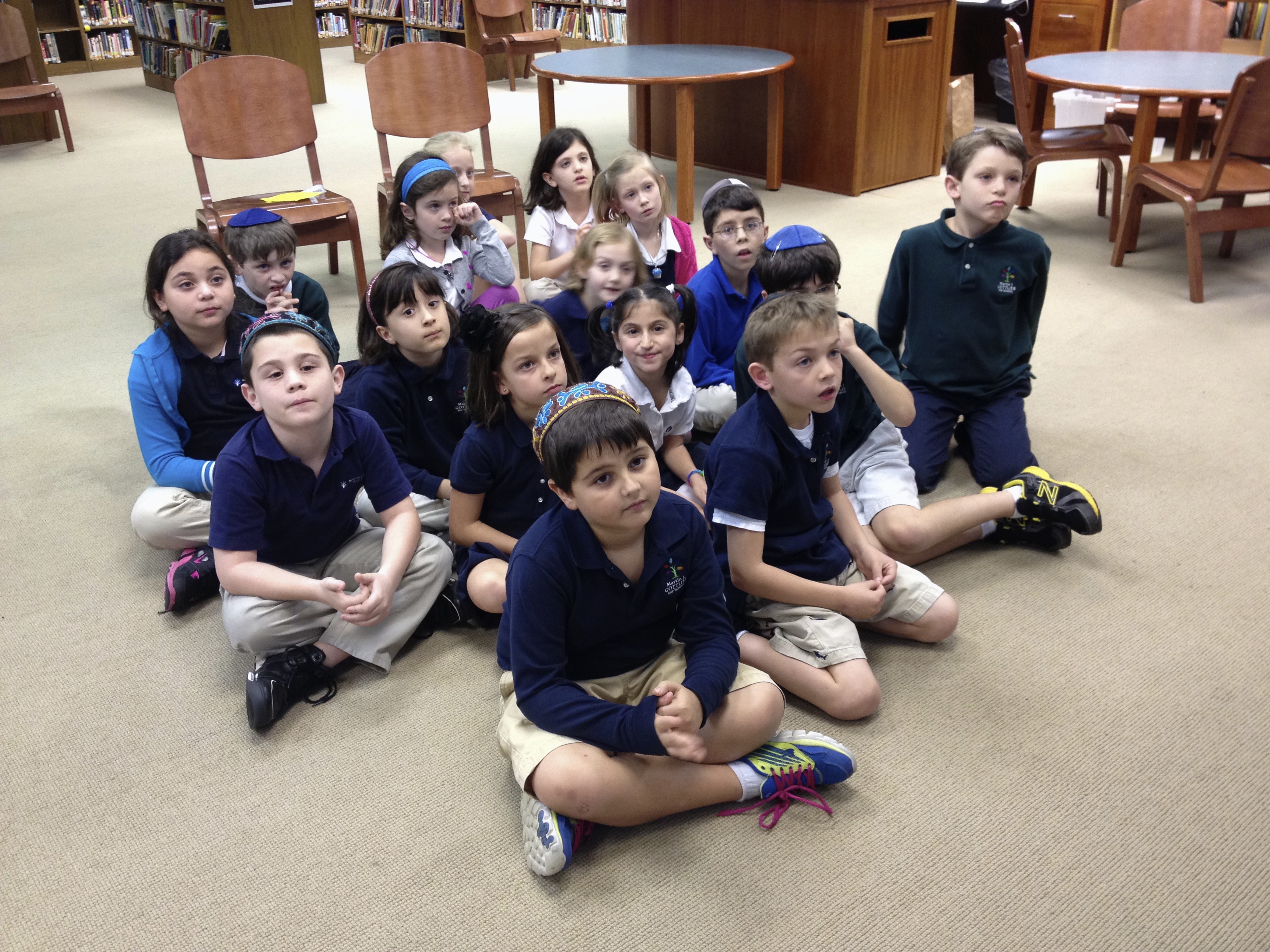
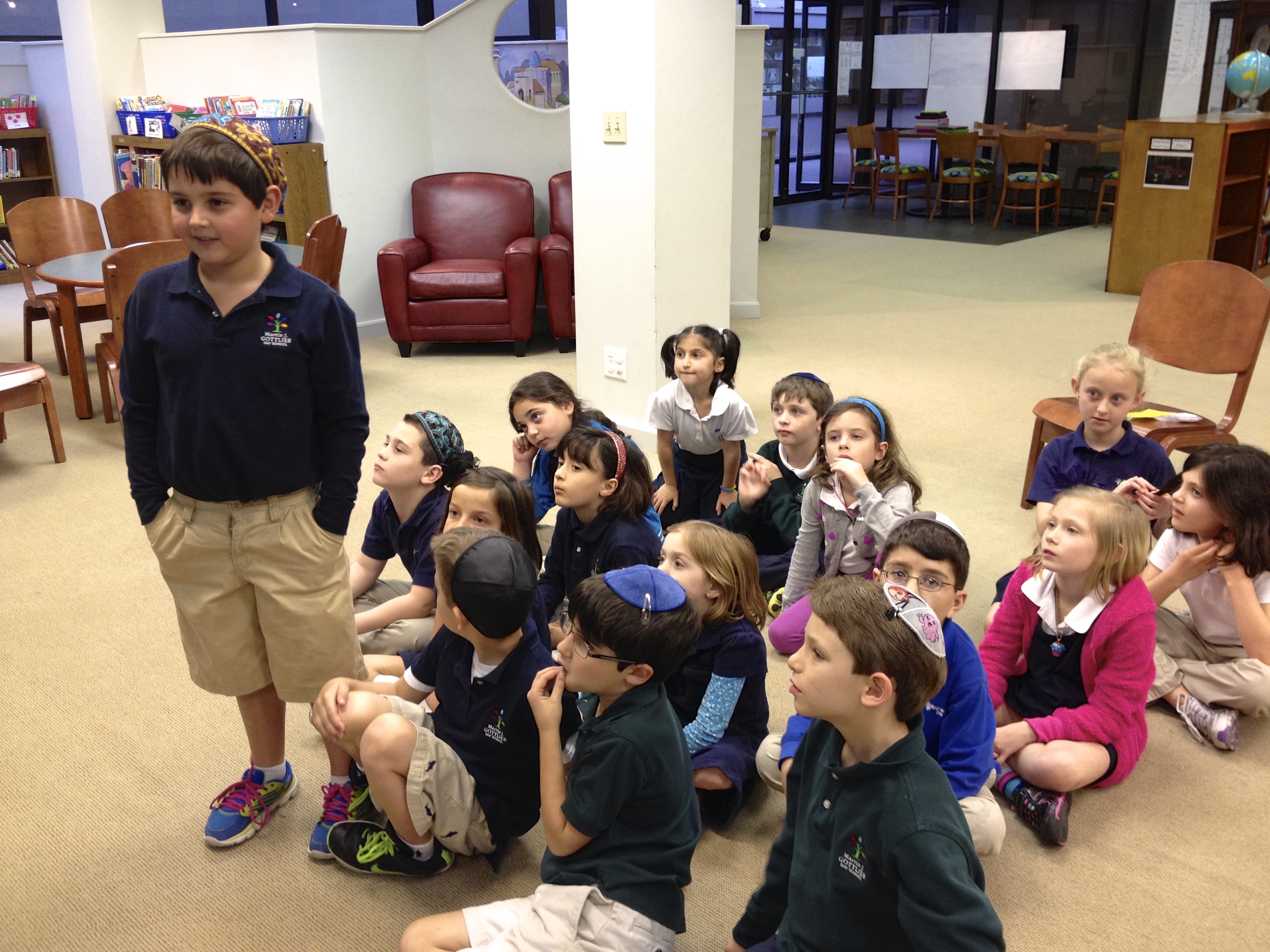
It’s been a busy week in our school library! Students in Kindergarten through Grade 5 celebrated International Dot Day. Originally launched by a teacher in Iowa when he introduced Peter H. Reynolds’ book, The Dot, on September 15, 2009, this event is now celebrated annually around September 15. This year, almost 2 million teachers and their students were expected to participate.

Here at the MJGDS Library we had several fun events planned. All classes watched a retelling of The Dot. It tells the story of Vashti, a little girl who believes she cannot draw. But when her teacher tells her to “make her mark and see where it takes you”, the single dot she draws and the paper she signs and then finds hanging framed on the wall inspire Vashti to be creative. Eventually, she has an art show of her dot creations and pays it forward by inspiring a little boy to be creative.

http://www.youtube.com/watch?v=t5mGeR4AQdM

Kindergarten: Dot Art!

Our Kindergarten students just let their imaginations run wild by creating dot art using a template I created. The rhyme is from the Magic Dot Paintings by Julie Burns. Also, Ms. Gutterman, our art teacher, is working with the students on a fantastic Kandinsky-style art project making concentric circles.!

IMG_2217

1st Grade: Trading Cards!

Our first grade students collaborated with a class at Isaac Dickson Elementary School in Asheville, North Carolina. Their librarian, Crystal Hendrix, and I asked our students to create trading cards, challenging their new friends in the other class “You Should Try…”. This was a three-step process. First we met virtually to introduce the classes to each other. Then we created our trading cards before we concluded with another virtual visit, complimenting student creativity and exploring differences and similarities about each other’s schools and cities.

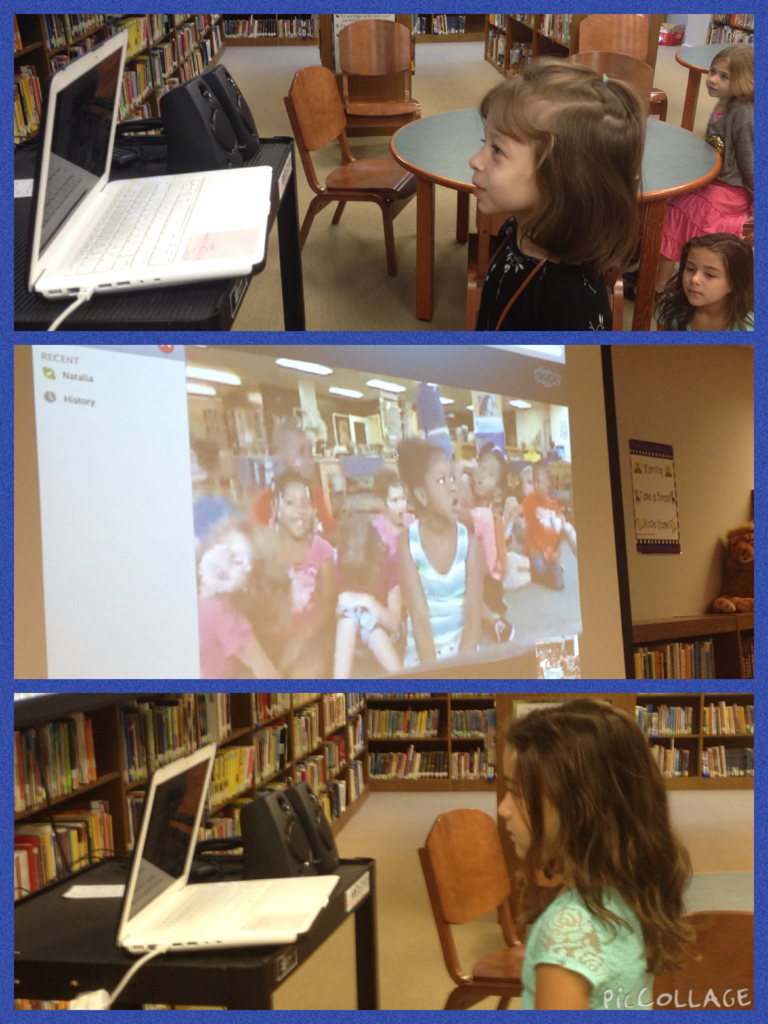
IMG_2157

PicCollage

2nd Grade: Dot Photo Scavenger Hunt!

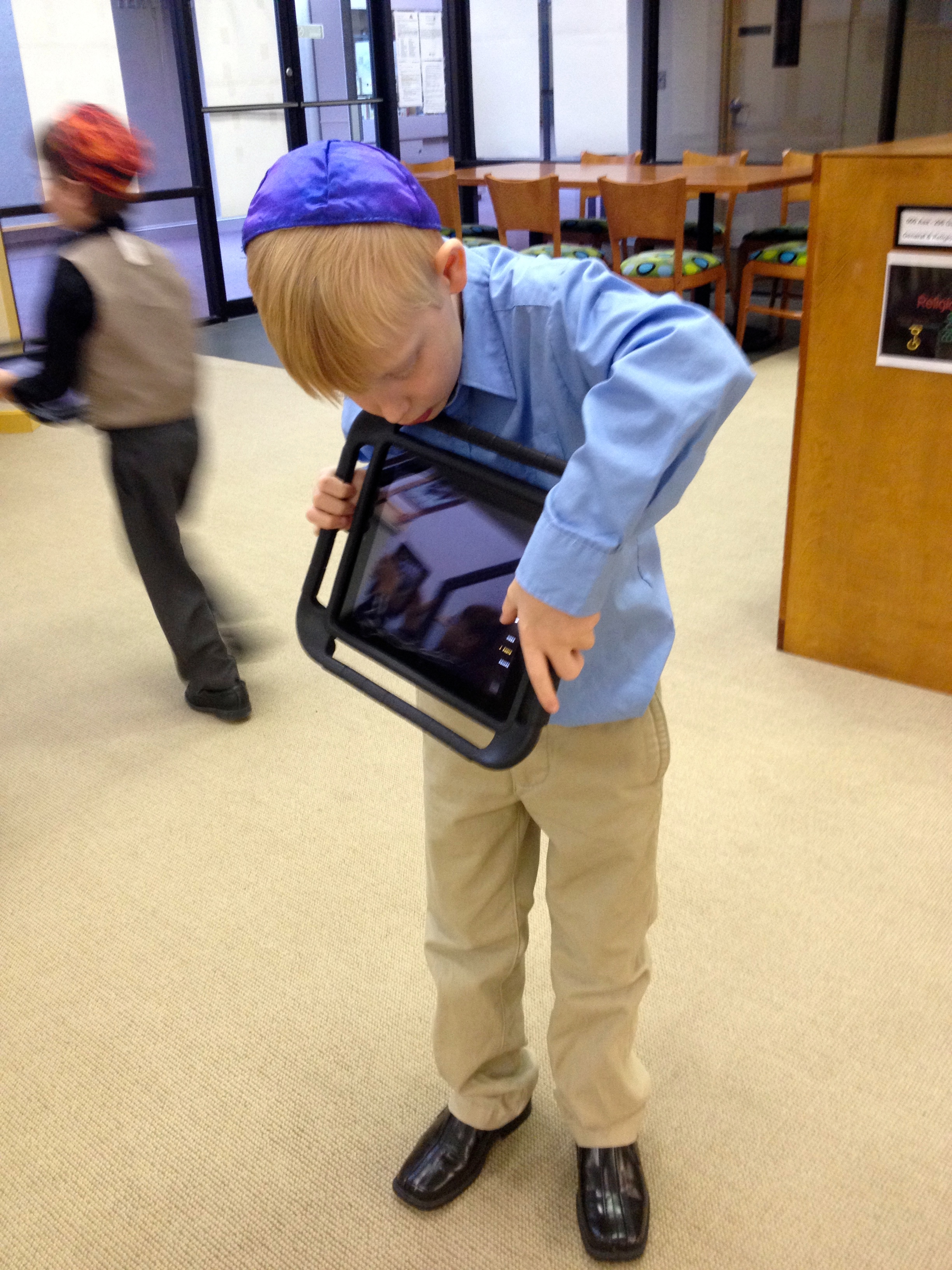
Our second graders made an international connection to celebrate Dot Day! They connected with Natalia Vergara’s class at The Graded School in Sao Paulo, Brazil. Each class went on a photo scavenger hunt using iPads. Amazing how many dots one can find in the library and in the students’ classroom! When we met our new friends in Brazil, we talked all about the many things we noticed in each classroom’s videos, for example the fact that each class has dot-shaped ceiling speakers and our library books have dot-shaped labels and there was a girl wearing a dot-dress in each class! But our class also noticed that we forgot to take photos of the eye-dots on the stuffed animals in the library. We hope to hook up again with our new friends in Brazil soon to continue learning about their school, city, and country.

 

IMG_2196 IMG_2194

2ndgrade

3rd Grade: Book Characters Make Their Marks!

With our third graders I tried something completely new. We focused our discussion on how Vashti made her mark in the story. There is of course the literal meaning of her jabbing the pen on the paper creating a dot. And then there is the figurative meaning of how her new-found creativity sparked an art show and eventually inspired another child to make his mark. For our lesson, I wanted the students to think of book characters who’ve made their mark. This was a very quick but fun lesson. Students first completed a template. In pairs, they then recorded each other using an iPad telling how their chosen book characters have made a mark. The results were amazing!

3rdgrade

 4th and 5th Grades: Augmented Reality Dots!

I introduced our fourth and fifth grade students to the colAR Mix app for iPad to get their creative juices flowing! This app allows students to view their drawings augmented by computer-generated graphics in 3D format. I downloaded the Dot Day coloring page from Fablevision’s site and the kids began creating. Amazing!

4:5grades


Creating a Community of Readers

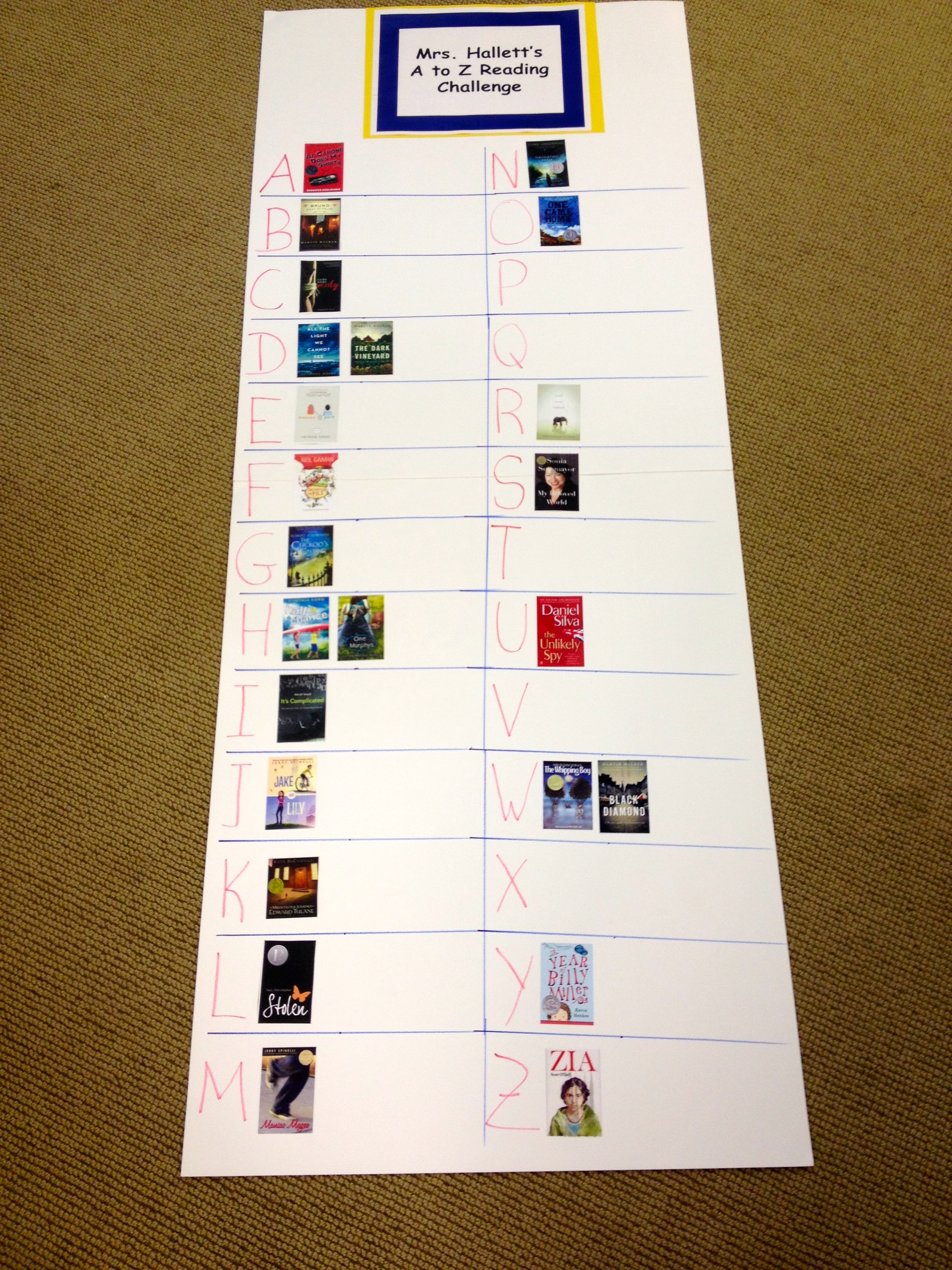
As part of an effort to promote reading and to build a community of lifelong readers, I asked my colleagues to demonstrate to our students that teachers are readers too. We created poster collages and prominently displayed book covers of books read throughout the year. This year, together with my colleagues Andrea Hernandez, Edith Horovitz, and Stephanie Teitelbaum, we’ve elevated the reading community idea to a whole new level. With the A to Z Reading Challenge, we are challenging our students to read through the alphabet. Feel free to read more about this challenge in our blog post recently published on Edutopia.

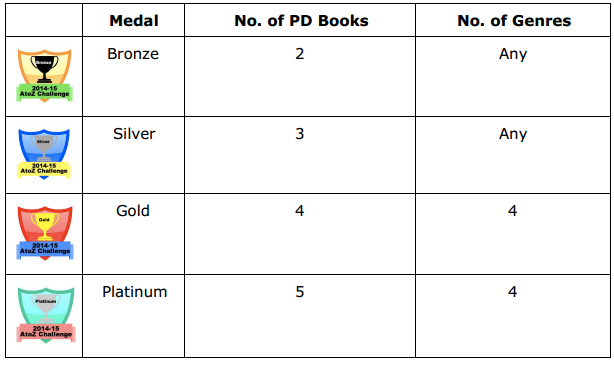
Acknowledging the fact that every reader has different reading preferences, students are participating in a more personalized reading experience, allowing them a choice of titles they find most interesting and meaningful. In all, we’ve designed four different challenges: bronze, silver, gold, and platinum–each requiring a minimum number of books and genres read depending on grade level. Students will earn a badge for their reading efforts.

A_to_Z_Logo

Only three weeks into the new school year, we are off to a fabulous start. The following image shows a mere snapshot of one student’s reading completed since June 2014. At the rate she is going, we may have to create a Double or Triple Platinum badge!

A-Z_Challenge_«_Julia_D

To continue the theme of building a community of readers, we are also challenging our colleagues to participate in a variation of the student challenge. Faculty must read at least two professional development books in order to earn a bronze badge. Reading five professional development books plus at least two books for each of the 26 letters in the alphabet will earn a faculty a platinum badge.

Faculty_Reading_Badges

The first faculty reading posters are up and quickly filling out! We are checking out each other’s posters and inquiring about books read. Informal conversations ensue–and community is enhanced! I’ve observed students and parents doing the same and asking about various titles. The reading community at our school is alive and well!

IMG_2043


Toolbox: Exploring Animated Media for Primary Education

As an educator striving to empower my students through new digital media, I’m constantly on the lookout for 21st century tools available to accomplish traditional tasks, like book reports.  The objective is always to strive for those Higher Order Thinking Skills, while socializing students to the power of digital media tools. Through their ToonUp5M campaign, PowToon for Education is currently giving away over 50,000 free classroom accounts. Each account is worth about $96 for one teacher plus 60 students and is good for one year. PowToon lets users create animated presentations and is currently including two free templates (with the promise of four total soon) with their EDU Classroom accounts.

imgres

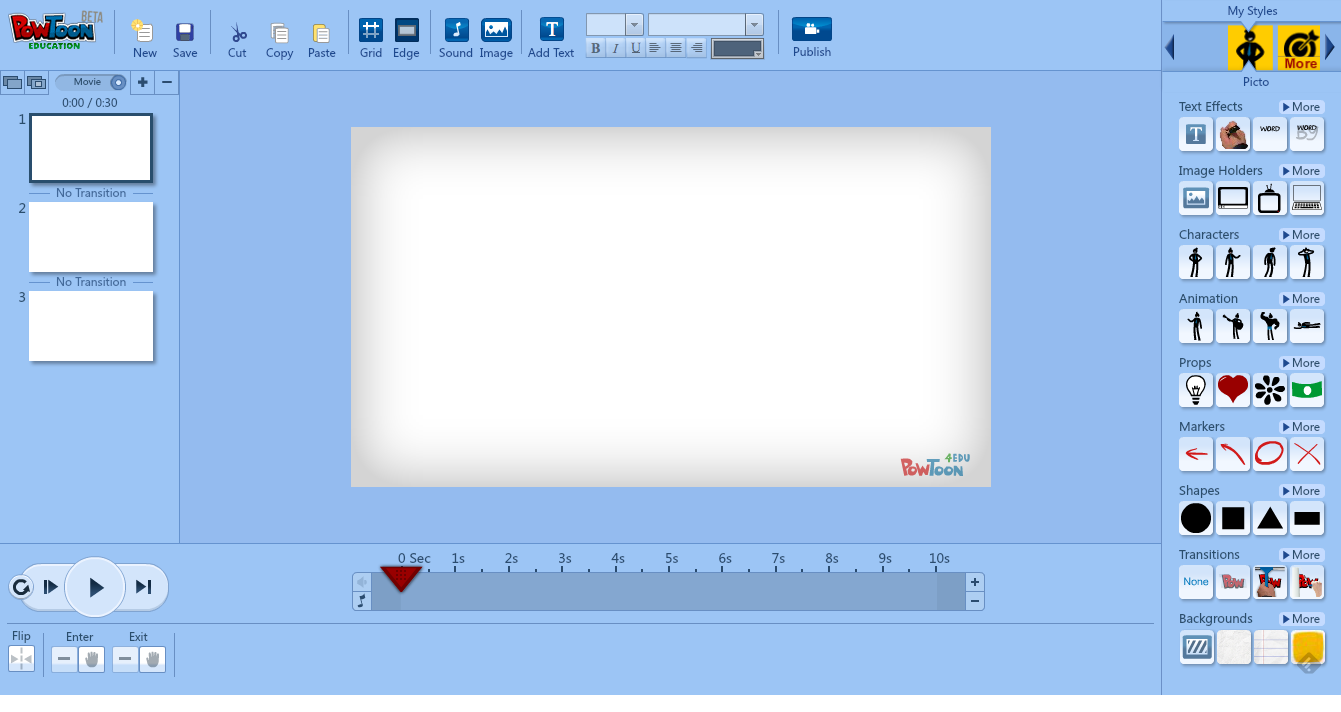
I edited the School Rules template to create my animated version of our library expectations. This year the resource teachers at my school agreed to implement the same classroom management plan based on Michael Linsin’s rules. While PowToon offers a number of video tutorials to help you get started, I decided to jump right in as I’ve always been one who learns best by doing. Although I initially had some issues figuring out the duration bar, I quickly realized that it is the most important tool when creating a Toon. It’s where one determines those nifty presentation effects, including when and how objects enter and exit the screen, if the text should be added one letter or word at a time, or the type of slide transition to insert.

PowToon Screenshot

One of the soon-to-be-released templates will be to create animated book reports, which I am hoping will be a user-friendly tool for my savvy 3rd grade students. I’m just a bit concerned that PowToon’s limited library available with the free account may not offer a great enough variety of characters, props, or backgrounds. The good news, however, is that images and audio can be uploaded, giving me the opportunity to teach the kids all about finding free-to-use files.

Currently, you may download PowToon in the Chrome store. If enabled by your organization, you can also install it as an add-on in your Google Drive. Since we have several 1:1 iPad classrooms, I would love to see a PowToon app. Please stay “Tooned” for my follow-up post on  using this tool for creating book reports with my students.

http://www.youtube.com/watch?v=ZHuNq7y5x5o

Liquid Learning: Using Subtext as a Digital Learning Enhancement

I was very fortunate to spend some valuable reading time every week during our third quarter with seven 5th grade students. Their language arts teacher, Andrea Hernandez, wanted to provide these students with a more personalized approach to close reading instruction. All seven students are excellent readers and we decided to challenge them with an unabridged classic, Around the World in 80 Days by Jules Verne. Since these students are in our pilot 1:1 iPad classroom and because I’ve been looking for a reason to give it a try, I decided to immerse our little group in a digital reading experience of this classic novel via Subtext for iPad app.

imgres

Subtext is a product of Renaissance Learning company (yes, of Accelerated Reader software fame), designed as a “collaborative ereading experience for K12 classrooms.” I chose to use the free, basic version of the app, which provided us with enough functionality. Alternatively, for a fee, users can upgrade to the premium features, offering access to CCSS-aligned assignments, text-to-speech option, and access to leveled nonfiction and informational texts. The only premium feature I would have liked to try out is the ability to track student progress. But since my group consisted of only seven students, it probably would not have made a difference. The basic version provided us with enough adequate functionality to upgrade our novel study to a new form of a social reading experience.

The app offers access to a large collection of ebooks, some for a fee and some are free. Since our classic is available in the public domain, we all downloaded a free version of Around the World in 80 Days directly into the app. I then created a “5th Grade Reading” group, inviting all seven members to join. Instructors have the ability to “enable student restrictions”, effectively preventing students from navigating the Web and sharing notes. I am not sure what the point of such restrictions is in an ereading environment, so opted to not turn them on.

IMG_0273

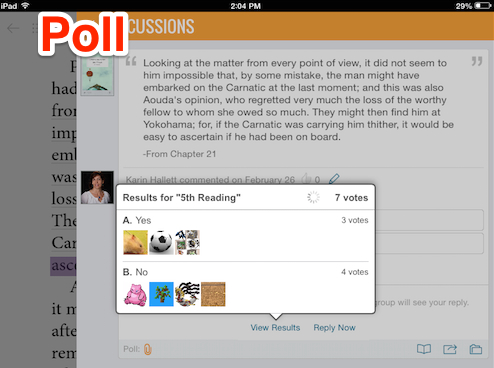
Mostly students read outside of our limited class time. To ensure students were reading more deeply and to assess understanding, I built discussion questions, multiple choice assessments, and polls directly into the text. These features allowed me to view and assess student responses prior to our next meeting in order to then focus on those parts of the text that needed clarification. As the teacher, I had the option to hide all responses until students submitted their answers.

Responses

Poll

MultipleChoice

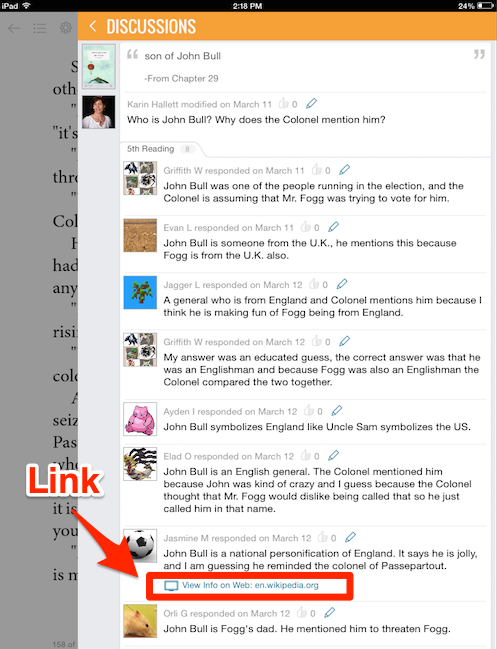
Another value-added feature of Subtext is the ability to embed links to websites, images, or videos. To help build background knowledge, I linked to information about the author, the Suez canal, a map of the British colonies and another of colonial India, an image of a cow catcher mounted to the front of the old American locomotives, and more. Students also were able to embed links into their comments.

StudentWP

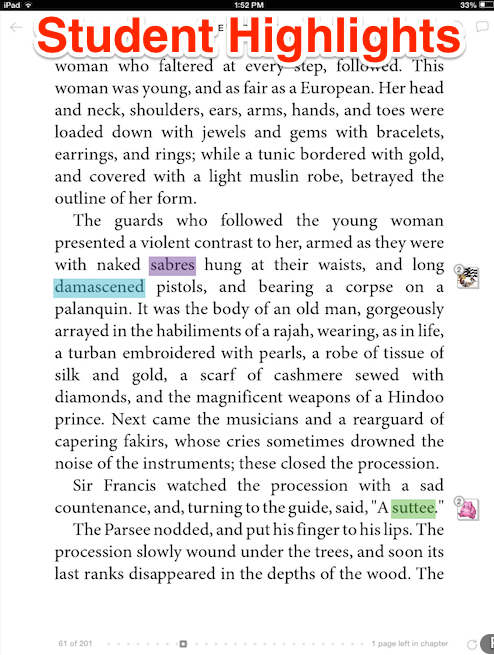
While reading, students highlighted words or entire passages and added notes. They then had the option to share the notes with the group. Simply tabbing a word pulled up a built-in dictionary, complete with audio pronunciation of the word and links to search both the Google search engine as well as Wikipedia.

StudentHighlights

The last feature we used is Subtext’s build-in link to Google Drive. Since our school uses Google Apps for Education, all our students have Gmail accounts and access to Google Drive. We shared a Google Doc of our schedule and this build-in link allowed us seamless access.

Would I use Subtext again? Yes! Using the app as a tool allowed students a different way of connecting with our text. Reading in groups is a social activity where students are learning with their peers. But using this digital tool elevated our small-group reading to a more inclusionary/participatory level by giving even those students who are usually not very vocal an equal voice. The lesson also demonstrates the power of liquid learning–most of the work was done outside of class. Also, the ability to build-in questions and to embed links facilitated active reading–although some students complained that the “the discussion questions…got in the way when there was a good part.” Most importantly, liquid resources like Subtext enable teachers to transcend the classroom and even school boundaries. Spending time together with a good book can include students across the room or literally across the world!

Coding: Taking On the Challenge of a New Literacy

One week last December coding was all the rage in educational institutions across the country. The Hour of Code™ effort aimed at exposing children in grades K-12 to the basics of computer programming and was spearheaded by a nonprofit organization, Code.org. This effort was endorsed by President Obama, Bill Gates, Mark Zuckerberg, and many other industry and business leaders in hopes of highlighting the ever-increasing gap between demand and supply of computer programmers. But the “Hour of Code” represents so much more than a fun module of learning: it is an effort to inspire deeper recognition of the building blocks of the digital universe. I introduced my version of the Hour of Code™ to our students in March.

Basic Tynkering Around

There are many great tools available to introduce basic coding skills. Kindergarten used Kodable and 2nd grade learned with Tynker for iPad. Both apps are free in the iTunes store and are very user-friendly, introducing basic programming concepts and problem solving in a kid-friendly way. Both classes LOVED playing around.

IMG_1554

IMG_1588

Intermediate Dabbling

I wanted to delve more deeply into coding with my 4th and 5th grade students. My 5th graders had been repeatedly asking me over the last months about the opportunity to code. So now I wanted to know from them what they knew about coding. Turns out several of the students had a very good understanding and a couple had already dabbled with coding. To get everyone excited, I showed them the 60-second teaser created by Code.org, Anybody Can Learn.

We spent our first lesson with the Angry Bird tutorial available on the Code.org site. The tutorial uses Blockly, a graphical programming language developed by Google, requiring students to drag blocks together. It consists of 20 game-like puzzles, which increase in complexity.

Learning to Fail. So while the kids were flying through the first eight or so puzzles, many were suddenly facing some challenges. We knew from the beginning that we would never finish all the puzzles in the lesson. The goal was just to introduce students to these new coding activities. Even though we did not have enough time to work through all puzzles in our lesson, several students decided to finish the tutorial on their own time. Perhaps the key to effective instruction on coding is to borrow Carol Dweck’s term “Growth Mindset” vs. “Fixed Mindset.”  The point is to emphasize the process and not the outcome. Once the tutorial is completed (with always more to learn!), a certificate will be emailed to the students. In addition to a certificate, however, my students asked me for a badge to be added to their Badge Backpacks. We are consciously integrating badges and certificates as additional achievement markers, such as genre reading badges.  My colleague, Shelly Zavon, is currently offering badges for various math activities.

Free Reign to Logic and Creativity!

Next, I introduced both classes to MIT Media Lab’s Scratch, a different programming language which uses the same basic graphical commands as Blockly. My goal was for students to create an interactive animation using Scratch. So we watched a great introductory video that briefly shows the various creative project possibilities. The kids were immediately hooked and ready to “scratch”.

My 4th graders were tasked with creating an interactive virtual pet animation and the 5th graders were to create an interactive About Me collage showing three things about themselves. The former is a project my colleague Andrea Hernandez had done with her students a few years ago and the latter is an adapted lesson from the Scratch Curriculum Guide Draft (2011). In all, students spent three 40-minute lessons “scratching”. Judging by their motivation and engagement, they could have easily spent even more time.

Transferrable Skills

So why did I decide to integrate coding skills into my library and media curriculum? Aside from the fact that my students had been bugging me about it, I was very curious about all the hubbub during the Hour of Code™ week. Both the Code.org site and MIT’s Scratch made it easy for me to learn some very basic coding skills. Coding is actually a lot of fun! Moreover, after witnessing my students in-action, from an educator’s perspective, coding empowers students with new literacy skills that:

  • engage students in new ways of thinking
  • develop problem-solving skills
  • strengthen mathematical and computational thinking skills
  • teaches sequencing
  • fosters creativity

All are transferrable skills.

In the meantime, several students created their own Scratch accounts to continue scratching–the biggest testament to student motivation and engagement!

The 4th and 5th grade students posted their final products to their student blogfolios. Following are some examples. To view them all, please search the tag MJGDS on the Scratch website. Or check out the following selected creations:

http://scratch.mit.edu/projects/19456206/

http://scratch.mit.edu/projects/19520328/

Digital Citizenship: Creating Quality Products

I’ve written earlier about my 4th grade students’ completion of their digital citizenship unit, remarking that their final product was too general and failed to reflect all the different aspects of digital citizenship. So I decided to avoid this pitfall by offering my 5th grade students more structure in creating their final product.

Common Sense Media’s Digital Passport™

images

First, we began with a review of all the different lessons we learned using Common Sense Media’s  Digital Passport™ app for iPad. Through videos and games, the app aims to reinforce key concepts about digital citizenship in five different modules: safety and security, privacy, cyberbullying, responsible cell phone use, and respecting creative work of others. As students work through each module, they collect a badge to ultimately earn their Digital Passport. I thought this would be a fun way to wrap up the lessons and wanted to give it a try after learning the app won a bronze medal at the International Serious Play Awards and was named a “Top 10 Educational Technology You Should Try This Year” in 2012 by eSchoolNews. The classroom version allowed me to set up student accounts and track and measure student progress.

Creating a Product

Students were tasked with creating a product to demonstrate knowledge of one of the concepts of digital citizenship we had studied (Internet safety and privacy, online communication, giving credit, cyberbullying, or digital footprint). Since my 5th grade students are in a 1:1 iPad classroom and quite savvy with a variety of tools, I wanted them to choose the tool they considered the best fit for their purpose. The idea was for them to be as creative as possible in articulating what they had learned about their chosen concept of digital citizenship.

At the same time, as mentioned earlier, I felt the process of creating a product needed to be fairly structured. So I provided the students with a worksheet to guide them by taking notes on the key vocabulary and important points about their topic. Also, students were tasked with developing a motto.

Digital Citizenship

Peer Review

Where appropriate, I’ve been incorporating peer reviews in all of my lessons. It is not only an opportunity for students to review their own work, but also to learn from their peer’s work by gaining a better understanding of the required criteria, possibly triggering further improvement and revision. The larger goal is always to give students more of a stake in their own learning and to understand the importance of quality work.

CD Artifact Checklist

Many of my students did a wonderful job, using the “Artifact Checklist” not only for peer review but first to ensure their product meets all the required criteria for a quality product. Unfortunately, not all students took advantage of this form of quality check. A few of my 5th graders’ artifacts produced less than satisfying results. In fact, it seems students rushed through the peer review process, quickly checking each box and not offering quality comments. Several of the “completed” checklists show lots of check marks but none of the boxes asking for the key vocabulary or important points filled in.

Producing a Collaborative Emphasis on Quality

Quality work is something I stress with all my students. I give them the time needed to really “go deeper” to focus on a project or product rather than to move on with less than satisfying results. Having students create their own digital products as alternative forms of assessment requires much more time than any traditional forms. So our last lesson was spent on critiquing products the students created. Equipped with the rule to point out something positive and then make a suggestion for improvement, I pulled up each student’s product and let the students provide constructive criticism. This was a great session, which produced a collaborative emphasis on quality. Students then had the option to revise their work. Since our students own blogfolios, the last step was to publish the product along with an explanatory blog post.

Overall, I am happy with the results, with special emphasis placed on going over the product one more time before pressing publish!

Please check out some of the creative products created by my students.

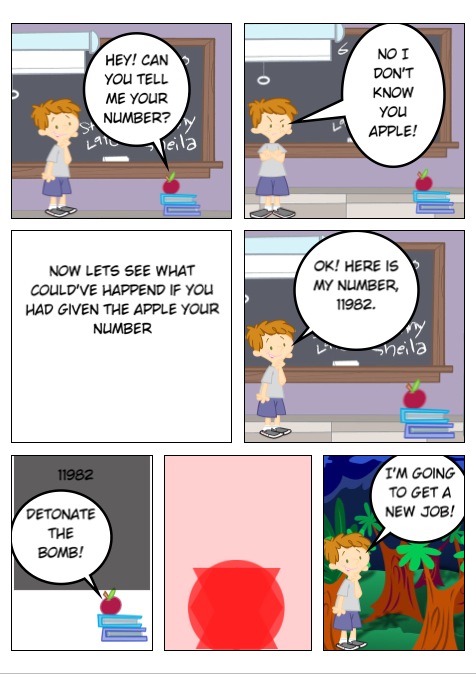
Griff’s Comic:

photo 1

photo 2

photo 3


Structuring a Lesson on Digital Citizenship

I have been working with my 2nd through 5th grade students on digital citizenship. There are lots of great instructional resources available online, but I have grown partial to Common Sense Media’s lessons and video library. While this not-for-profit organization suggests a scope & sequence for teaching the various topics/building blocks that make up digital citizenship, I’ve decided to adapt some of the lesson plans to better suit my students’ needs. My fourth grade students just completed their last unit lesson, “Digital Citizenship Pledge”. For a final product, they created Digital Citizenship posters.

We began by brainstorming everything we had learned these past few weeks about digital citizenship and discussed adding a motto or slogan to our posters. How do you package a concept like digital citizenship into a few catchy words? Not an easy task for some of the kids, but in the end they came up with great posters.

20140115-143036

I do know that the students understand the various elements that make up digital citizenship, but in hindsight I don’t think creating the posters was the best artifact for students to show their learning. This already occurred to me while the students were brainstorming their mottos. Even though we came up with many examples from the advertising world and discussed how mottos are short and catchy, there were still some students whose mottos consisted of two long sentences. Also, while creating this poster was definitely a quick process, it was too general.

So for my 5th grade students, who have also completed the digital citizenship unit, I’ve decided to change things up a bit.  I’ve provided more structure in the form of a worksheet. Students are to choose from one of the five main topics we learned about digital citizenship. They then think of a motto, decide on the digital product they plan on creating, and brainstorm important points and key vocabulary they will include in their artifact.

Digital Citizenship

So far, most students have  completed the worksheets and  I am encouraged by the level of detail they provide and the creativity they show. So stay tuned for a great variety of student-created artifacts about digital citizenship!

IMG_1378

I SPY: “The Project That Keeps on Giving”

IMG_1496

“This project just keeps on giving” was my colleague’s, Arlene Yegelwel, comment on the second blog post about our 2nd grade students’ I SPY project. Arlene is right! After working hard on creating our class I SPY book and then on perfecting our interviewing skills as a means of project reflection, we enjoyed a fabulous virtual visit with Jean Marzollo, author of the I SPY book series, today. It was Jean’s challenge that inspired our own class book and resulted in about 20 minutes of insights and learning from the author herself.

IMG_1479

IMG_1487

As new experts in the process of creating an I SPY book, our students were especially curious about Ms. Marzollo’s process. They wanted to know how she finds the items for her collages (turns out most are selected by the I SPY photographer, Walter Wick), how she creates the rhymes (as this was not always easy for our kids), and why she chose a 4-beat rhythm for her riddles (we did a lot of clapping to practice). Lots of great questions!

Reflection__I_SPY___The_Project_That_Keeps_On_Giving__-_Google_Drive-2

Notice the last question about advice for improvement of our class book. No, Jean did not have any advice for us–instead she praised our book, describing it as “the best one yet”, and telling the kids that they “deserve a blue ribbon” for their work. And she asked if she could feature our work on her website.
The second grade students, their teachers, and I are both thrilled and honored. Thank you, Jean Marzollo, for inspiring us and visiting with us!

Hands On! Interviews for Peer-to-Peer Reflection

At our school, we talk a lot about “reflecting” as a means of self-assessment and thinking more deeply about learning.  Faculty write weekly reflections on our faculty Ning and our students write on their blogfolios. So in order to provide our 2nd grade students with a form of reflection after the completion of their I SPY class book, I decided to have them interview each other.

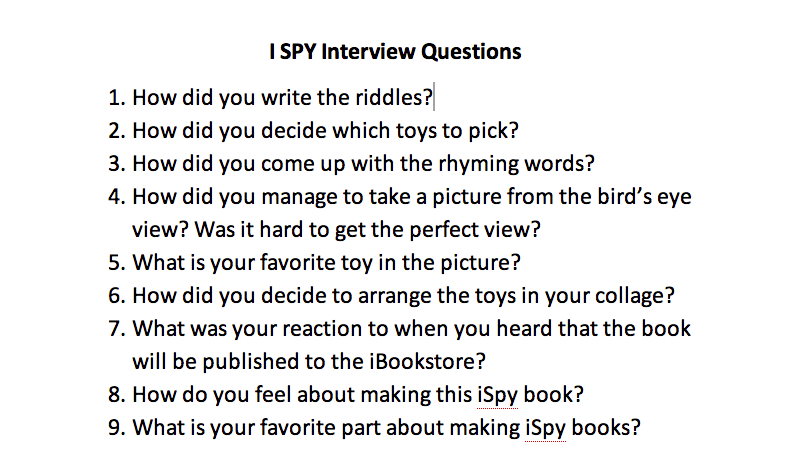
We first talked about the concept of an interview: What is it? What is it’s purpose? Rather than just letting them loose, I felt it important to provide students with some potential interview questions. So we brainstormed:

I_SPY_Interview_Questions_-_Google_Drive

The students were paired up, provided with an iPad and a printout of the questions, and instructed to take turns interviewing each other–where the interviewer was also the videographer. The only requirement was to ask at least three of the brainstormed questions.

PicCollage

The interviews turned out great. Definitely listen to the kids reflecting on their learning:

Teacher Coaching: Art, Science, or Cottage Industry?

imagesIn her book, The Art of Coaching: Effective Strategies for School Transformation, Elena Aguilar summarizes her background working in under-resourced public schools while serving challenged students in an urban environment. Aguilar describes coaching as a potentially valuable resource for impacting both individual teacher practices as well as student outcomes. Effective coaching, however, requires “necessary preconditions” in schools in order to flourish, such as principals who “demonstrate effective leadership” and teachers willing to be coached. The Art of Coaching promotes both “Directive” and “Facilitative” coaching models that are collaboratively developed. “Directive” coaching changes the client/teacher’s behavior, with the coach serving as a subject matter expert who shares expertise. In “facilitative” coaching, however, the coach works more as a process facilitator, not sharing expert knowledge, but targeting the pursuit of new skills and habits. “Transformative coaching” incorporates strategies for both Directive and Facilitative coaching models. Aguilar repeatedly highlights inequalities in educational attainment and school performance across race and ethnicity, directing much of her writing toward the belief among many teachers that school system performance is more a reflection of the home environments and neighborhood conditions of children than of teacher effectiveness. She effectively promotes coaching as a means of empowering under-resourced teachers in challenged school districts to better cope with the stresses of teaching. Aguilar emphasizes the importance of a trusting relationship between teachers and coaches.

I have to admit that I am somewhat reluctant about the “Steven Covey-fication” of education as expressed in The Art of Coaching. I personally prefer the term “facilitator” over “coach.” Still, one gets the sense that Aguilar is a seasoned teacher who strives to provide both useful strategies and emotional support to overwhelmed teachers. I was most drawn in the book to points where Aguilar hints at larger structural contradictions while adopting “six lenses” from the National Equity Project on changing expectations of teachers: 1) inquiry; 2) change management; 3) systems thinking; 4) adult learning; 5) systematic oppression; 6) emotional intelligence. The Art of Coaching provides a window into the challenges facing public education and a solid introduction to teacher-led coaching. It is a good book and I recommend it.