A Lesson in Social Bookmarking in the Classroom

4th Grade Collaboration

Introduction
Diigo (Digest of Internet Information, Groups and Other Stuff) is a free social bookmarking tool that allows its users to store, manage and share Internet resources. Users can bookmark, highlight, tag, and annotate selected web pages while reading online. As they are stored in the cloud, bookmarks can be retrieved from any computer anytime and anyplace. Resources may be shared with other users.

As a social bookmarking tool, Diigo clearly has the potential to make reading and research a social activity in the classroom. In collaboration with our social studies teacher, I’ve used Diigo with our 4th and 5th grade students: 4th graders were researching the pre-colonial French settlement Fort Caroline (Jacksonville, Florida) and 5th graders were gathering information on the Lost Colony of Roanoke (North Carolina). Using the researched information, students are currently in the process of creating eBooks about their topics.
Objectives for students were:

  • to research and become familiar with informational texts about their respective topics
  • to use Diigo to collect and organize their new information
  • to apply various Diigo features, including highlighting and annotating of web pages or text passages and  tagging of web pages for organization and classification

Setup

With an educator account, I created a Diigo Group for each class. Privacy settings of educator accounts are pre-set, limiting communication to assigned teachers and their students. Also, by default, student profiles are private. Each student was provided with their login information and created an avatar for their profiles using one of the following websites:
Diigo Group

In each classroom, we then created tag dictionaries to categorize websites, ensuring consistency of keyword tags. We brainstormed tags to include in each dictionary, for example “Ft. Caroline” instead of “Fort Caroline”, or “Native Americans” instead of “indians” or “natives”.

Tag DictionarySteps

Since our students already had an introduction to Web search techniques in an earlier unit, I began by focusing on annotations. The great benefit of Diigo’s annotation tool (virtual “sticky notes”) is that it allows students to summarize a website’s important concepts and main points. Annotations encourage student interaction and engagement and are central to collaborative research. The students explored: What are the elements of a quality annotation? We brainstormed and I used the definitions students gathered to create a reference sheet:
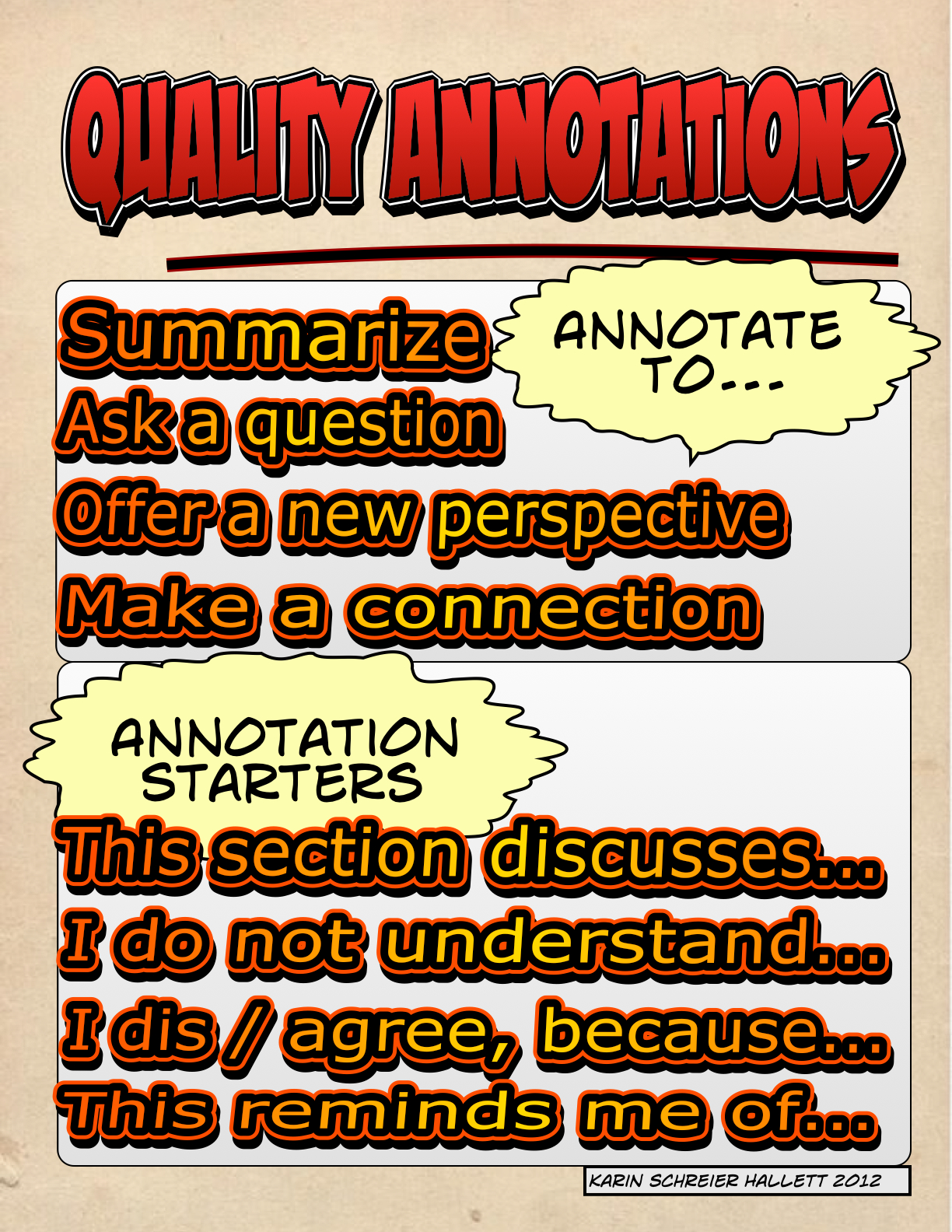
Quality Annotations

While the process may seem straightforward, students struggled with the concept of a quality annotation. I’ve blogged about this issue here.

Evaluation

Research is not simply about finding information, but also evaluating and synthesizing the information found. The skills necessary to evaluate and synthesize require students to read text closely and paraphrase the useful information, respectively. These are critical, transferable skills, but working with elementary students I have learned that these are often the most difficult for the students to grasp.  Thankfully, we were not under any time constraints, giving us time to model and review when needed.

For my students, Diigo is a powerful collaborative learning tool in the classroom. Students interacted with informational text and with one another and were motivated to stay on task. They read, highlighted, tagged, and annotated relevant websites for their research projects.

Best content in 4MJGDS | Diigo - Groups

The annotation process, however, was harder to learn for my 4th than my 5th graders. Fourth graders also spent a lot more time looking for relevant images than focusing on reading text. Reasons may be maturity, existing skills, class size (20 vs. 11 students), time of day (Friday afternoon classes for 4th grade), or a combination.

Overall, this was a great collaborative project. Diigo allowed my students to not only manage information, but also to hone their communication and collaboration skills — all vital to success in school and their overall future. I would like to repeat this lesson, possibly on a grander scale: Not only with a classroom at another school, but perhaps “classmates” in another country.
Quality vs Safety

I always strive for quality work. Producing quality work, however, involves stepping out of my safety zone and challenging myself. But it also involves time. In the case of research, the process of producing quality work can be quite laborious.

My 4th and 5th grade students are currently researching Fort Caroline (the first and rather short-lived French fort in the U.S. located here in Jacksonville, Florida) and the Lost Colony of Roanoke, respectively. To organize our research, we are using Diigo, a powerful social bookmarking tool. I’ve created a Diigo Group for each class via an educator’s account. Within each group, students are collaboratively collecting websites on the topics and annotating them using Diigo’s highlighting and sticky note tools.

So while the process seems pretty straightforward, it is actually quite messy. I’ve now spent two 50-minute sessions with each class searching, collecting, and annotating. Students are finding that they have to closely read each web page, evaluate it for its merit, and then offer a quality annotation. This last step is hard.

Before beginning the actual search process, we came up with a definition of Quality Annotations. I’ve compiled it as a quick reference sheet and then added annotation starters.

Quality Annotations

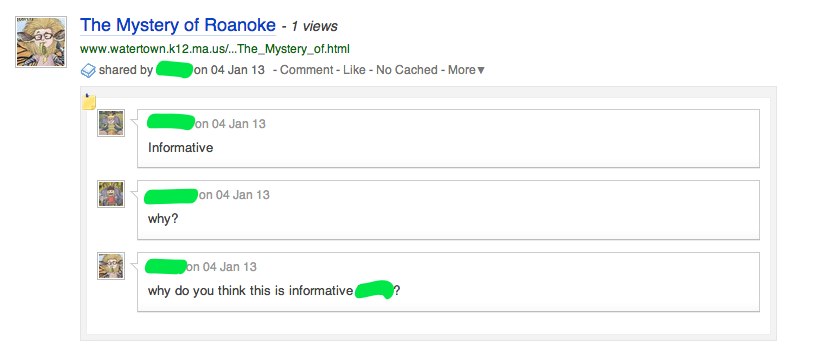
With each class, we’ve looked at the web pages collected and the annotations added. Students clearly love Diigo’s highlighting feature and are good about not simply highlighting large sections of text. But they do need to work on their annotations! Too many of them simply say “informative” or “descriptive”.

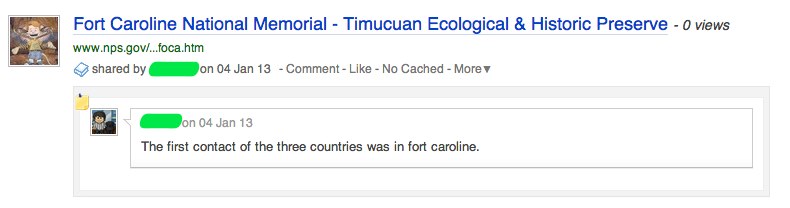
Diigo Screenshot

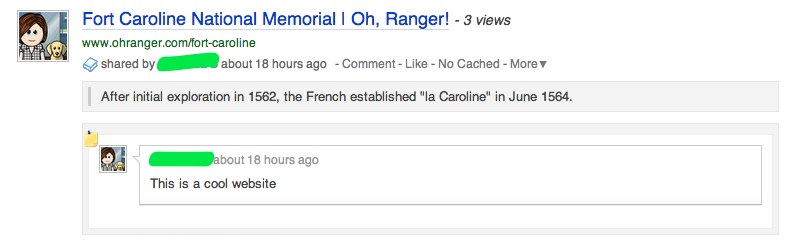
Diigo Screenshot 2

While the above are not representative of quality work, students are capable as shown in the following examples:

Diigo Screenshot 3

Diigo Screenshot 4

So the big question is: How do you ensure quality work? In this case, how do I get my students to read text or examine an image closely, evaluate the information provided, and then offer a quality annotation that contributes to the class collaborative research?

My plan is to begin our next session with something we should have done before starting our research: Brainstorming research questions. What do we want to know? Then, each student will edit their “My Library” (Diigo terminology for bookmarked web pages etc.) and evaluate their work according to the following criteria:

  • Does the web page / image provide important information that answers my research question?
  • Did I highlight the important information?
  • Did I add a quality annotation?
  • Are all my research questions answered, or do I need to search for more information?

1st Grade Authors

A discussion of basic literary elements (character, setting) using several different picture books led to the creation of eBooks by my first grade students. By creating the eBooks, students were to demonstrate understanding of character, setting, and a sense of sequencing, while practicing their written storytelling skills. To begin the process, I used a wordless picture book (relies entirely on illustrations to tell a story) to allow the students to show off their creativity and imagination while developing their writing skills. They needed to interpret the illustrations (visual literacy) and then write sentences about each picture (reading and writing literacy) to tell a story. I chose a total of six pictures from The Red Book by Barbara Lehman (2004). Students used the Book Creator app on the iPads to create their masterpieces. Following are the various steps:

1. We began by looking at an example, the Butterfly ebook created by our school’s last First grade class (in 2011). We discussed how this book is visible to anyone in the world with an Internet connection and the importance of doing a really good job when publishing.

2. As a class, we used our visual literacy skills to briefly describe all six pictures I had preselected from The Red Book.

Book Creator 1 - Google Drive

3. With a copy of the six pictures in hand, students then each decided on the order of the pictures for their own stories and used a storyboard template to develop their stories.

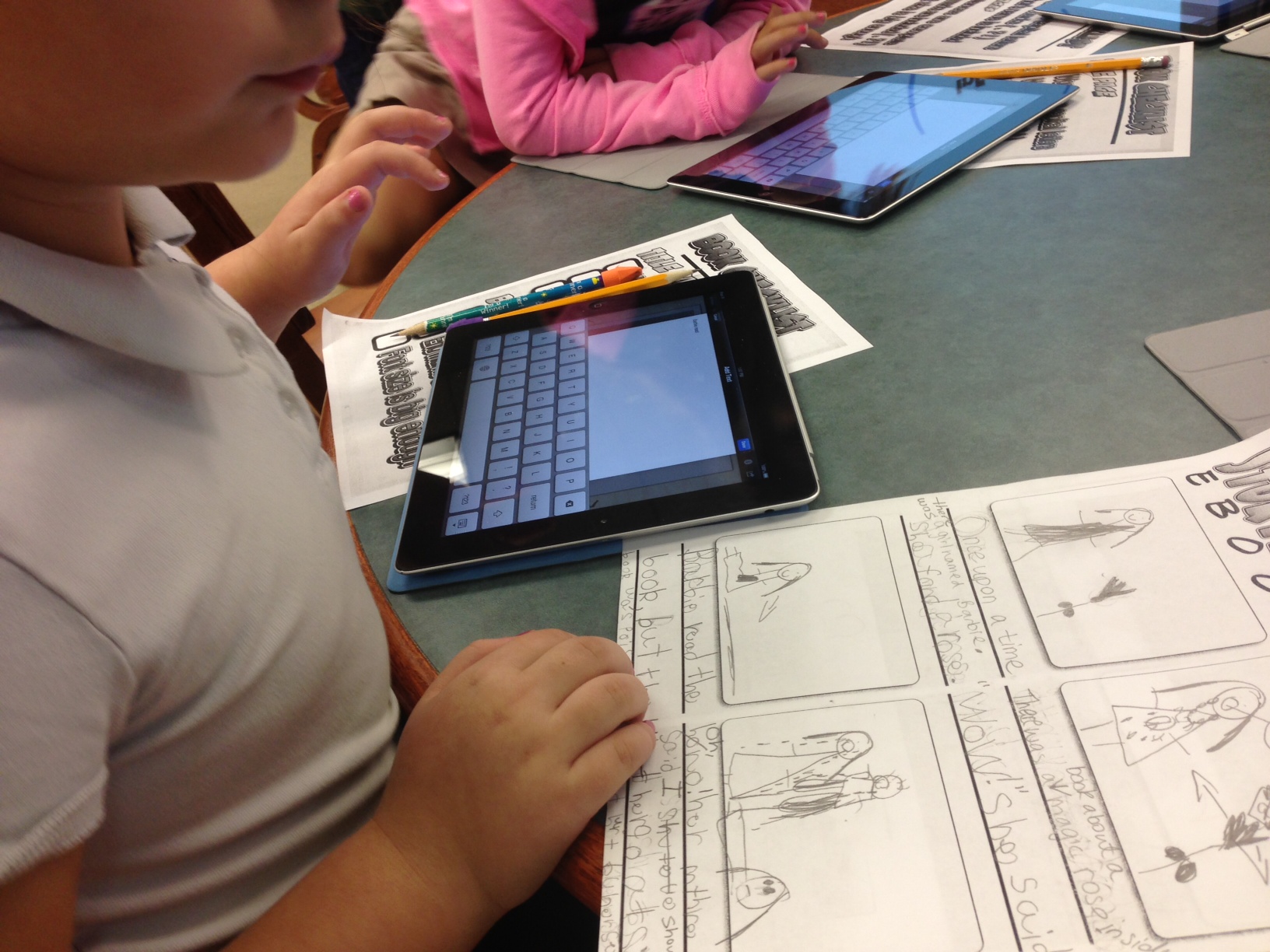
4. The next lesson was spent transferring (typing) handwritten text from the storyboards to the Book Creator app.

Transfer to iPad

5. Once typing was completed, students created the artwork on paper with colored pencils. I then used each student’s iPad to take photos of the pictures and  imported them into each story.

Transfer text

6. An important part of the eBook creation process was the review and edit process. Students used a Book Checklist while reading through their stories and carefully marking off each box.

Using Checklist

Check out some of the very creative eBooks by the 1st grade authors!

7. Reflections

Lastly, it was time to reflect on our learning. We first reviewed the process of creating our eBooks by remembering all the different steps. We also discussed the different products used (iPad, pencil and paper, storyboard template, editing checklist). Finally, we talked about the skills we learned (identifying literary elements in fiction, using different products, matching illustrations with our sentences, editing our work). Before video recording student reflections, I offered my own reflection as a model for the students.

My Reflection

  • I’ve learned that 1st grade students are very creative.
  • I’ve learned that even though they cannot yet spell many words perfectly, 1st graders like to write. And they like to draw too!
  • I’ve noticed that 1st grade students know all about setting and character and used both in their books.
  • I’ve discovered that 1st grade students quickly learn new words, like font, end mark, and checklist.
  • Also, I’ve discovered that 1st grade students love working with the iPads. They are little wizards with this tool! Swiping and tapping comes naturally to them, and even though I only asked them to change the font size to make it more easily readable, they immediately discovered how to change the font style altogether.
  • I’ve learned that creating eBooks is a great skill builder.
  • I’ve truly enjoyed working with 1st grade on our very first eBook creation!

Student Reflections

Listen to the student reflections in the following brief video. I am looking forward to your feedback!

A Student Reflection

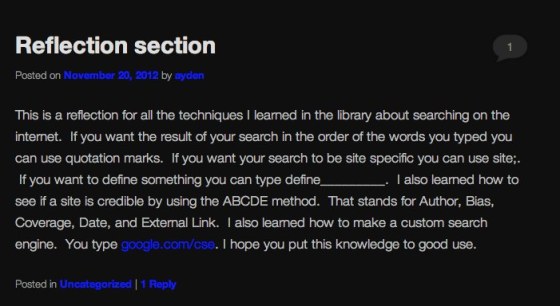
At my K-8 school, students are continuously building their own blogfolios. The blogfolios are cross-curricular and meant as tools to show student learning. So it was particularly gratifying to read one 4th grader’s post about a unit I recently taught on search techniques, Website evaluation, and creating a custom search engine.

Ayden I Search Engine Post

To link to the student’s blogfolio, click here.

Participatory Culture

Recently, while surfing the Web, I came across a great TED talk on participatory culture by Henry Jenkins. In less than 20 minutes, Jenkins provides an excellent overview of the history of participatory culture and a convincing argument why it is here to stay and the need to prepare our students accordingly. I highly recommend listening/watching.

We talk a lot about collaboration and the value of being globally connected–for ourselves and our students. Collaboration and connectedness are expressed by active participation in social networks/communities rather than passive consumption of information. According to Jenkins, a participatory culture is one:

  1. With relatively low barriers to artistic expression and civic engagement

  2. With strong support for creating and sharing one’s creations with others

  3. With some type of informal mentorship whereby what is known by the most experienced is passed along to novices

  4. Where members believe that their contributions matter

  5. Where members feel some degree of social connection with one another (at the least they care what other people think about what they have created).

The historical perspective Jenkins provides was the most interesting to me. He traces participatory communities back as far as the mid-1800s, when young people formed amateur press associations and used printing presses to engage in discussion forums. They were “social networks that existed around print.” In the 1920s, schools, boy scout groups, religious institutions, and others had amateur radio operators for communication purposes. In the 1960s, the underground press became the key voice of the counterculture. And in the 1990s it was the Super 8 camcorder activists who “build social networks to make a difference in the world.”

I’ve never really thought about the fact that once the technology was in place, it served to create various social networks throughout history. Obviously, information and communication technology provides a whole new scope to social networking. I do wonder if our students realize that they can be active participants on a global scale? If they understand the power provided to them?

Collaboration and networking is nothing new, but we now have the means to extend our reach further than ever before. In another venue, Jenkins states that

Participatory culture shifts the focus of literacy from one of individual expression to community involvement. The new literacies almost all involve social skills developed through collaboration and networking. These skills build on the foundation of traditional literacy, research skills, technical skills, and critical analysis skills taught in the classroom.

Preparing our students properly for this new version of participatory culture, leaves us teachers with an incredibly urgent task.

The Future of Learning?

I recently watched The Future of Learning, a production by the international ICT giant Ericsson. In this video, the company is presenting the role information and communication technology plays in our “networked society” by interviewing internationally-known educators to explain how learning has changed from a static/analog environment to one centered around individual needs. Doubtlessly, Ericsson has a business interest in networked education…still the video is illustrating how technology has changed the world we live in and has influenced how we teach and learn.

As technology continues to transform our society, those responsible for our current systems of learning and education are facing overwhelming pressure to adapt. Education technology, connected learning and the rise of the Networked Society is transforming the established concept of learning, teachers’ roles and even the the nature of knowledge itself. (http://www.ericsson.com/thinkingahead/networked_society/learning_ed…)

The video starts with a look at the roots of our education system–the need for “identical people”, be it as soldiers for the military, as assembly line workers during the Industrial Revolution, or as consumers who buy the same things. But today, as is stated in the video, and I agree, the old “structures and strictures of school” no longer apply in a world where information is abundant. “A teacher doesn’t need to give any answers, because answers are everywhere.” Also, students who find an answer for themselves retain information better. The problem is that “education is being very slow to look at data, to look at numbers, to look at analysis and at what is actually happening.” Instead, we rely on tests and exams for data. So, the prediction is, according to the video, that the ability to analyze learning is the next big thing.

Computer-analyzed learning, or “adaptive learning” is introduced by Knewton, a company that offers “personalized education for the world”. While I agree with many of the statements in this video, I strongly disagree with this personalized form of education pushed by Knewton.

Knewton is a technology company that uses data to continuously personalize online learning content for individual students. Knewton analyzes data about the performance of each student and similar students on the platform, as well as the relevance of the educational content, in order to serve up the best activity for each student at a particular moment in time….The platform is continuously adaptive, meaning it responds in real time to each student’s activity on the system and adjusts to provide the most relevant content. The platform refines its recommendations through network effects that harness the power of all the data collected, for all students, to optimize learning for each individual student. (http://www.knewton.com/about/)

My reaction to this segment of the video was decidedly negative. I envisioned little student robots glued to computer screens, surrounded by a glass bubble. Is this what we want the future of learning to be? Is this student-centered learning? Do we want teachers to be replaced by online “substitutes”? If learning is social, where is the social aspect in such an online learning environment? In my last position, I’ve taught online classes, but even then, there was communication via chat rooms, discussion forums, video conferencing, and email. This was at the college level. I am not a proponent of online classes for the K-12 environment. I think for our students it is crucial to be part of the social environment offered by a classroom and school. Social skills are learned! Also, where is the creativity in an online environment? Where is the room to wonder and ask questions? To think outside the box? And are we not learning from mistakes as well?

Individualized/personalized learning is a good thing, but it must not be a student-computer relationship. We must not forget that educational technology is merely a tool to achieve learning. When we are networking it is about connecting with people not with a computer.

I believe computer-enhanced learning offers a great supplement to classroom learning–but should never replace it.  I’m very cynical about profit-driven corporations taking teachers out of the classroom. Especially during the formative years of K-8, learning in a real-time physical community offers children the greatest protection against our system producing “identical people.”


Lesson: Creating Custom Search Engines

Recently my 4th and 5th grades students created their very own Google custom search engines. The students had been anticipating this lesson since the start of our website evaluation unit. Fourth grade in particular could not have been more hyped (literally!) about this hands-on project. As teachers, we talk much about the value of authentic learning and I have to say: This lesson was it!

We began the lesson by exploring the difference between a site search and a custom search. I showed some examples to illustrate the differences (our school’s homepage basic search function, the realclimate.org site and custom search options, and my science fair custom search engine). The highlight during 5th grade’s lesson was when one of the students correctly remarked that custom search engines function much like the “site: search command” I had taught them in an earlier lesson. The student not only made the connection but proved that she clearly understood the inner workings of the Web. I had planned on mentioning this fact during the course of the lesson, but it is so much more powerful when it comes from a student!

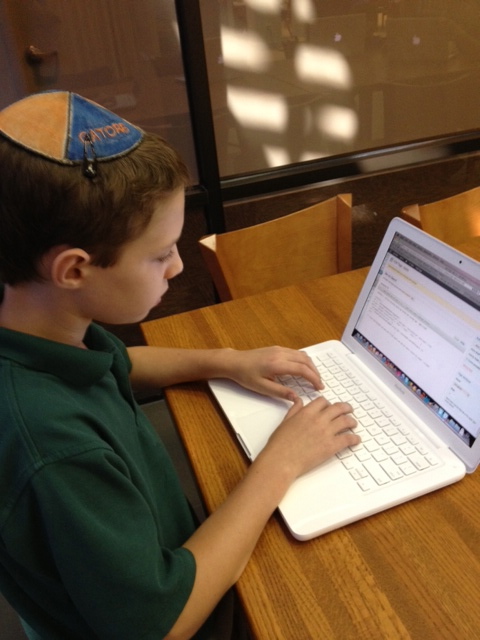
Each student was provided with a laptop and the teacher station is connected to a projector and screen. Also, our students have Google accounts and their own WordPress blogs. I’ve aligned this lesson with American Association of School Librarians (AASL) Standards for the 21st-Century Learner. For the complete lesson plan, click here.

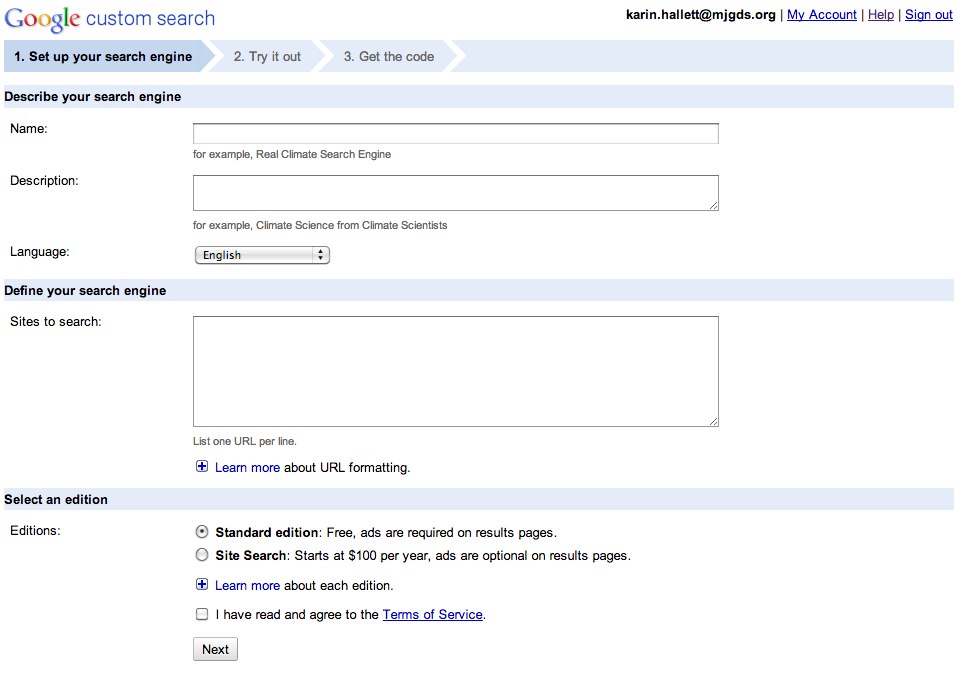
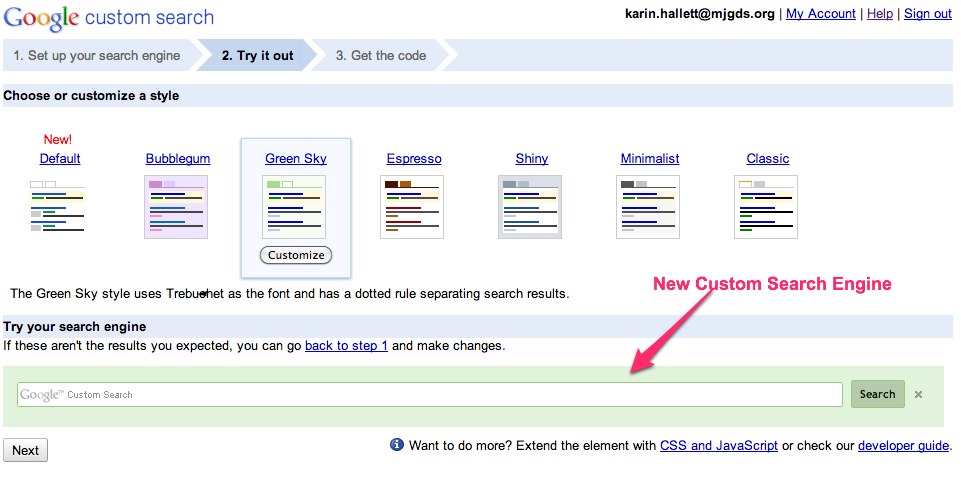
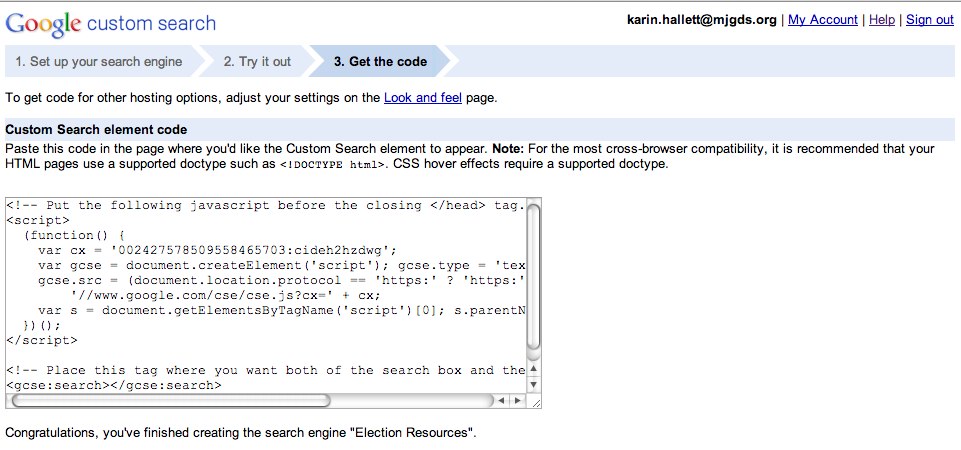
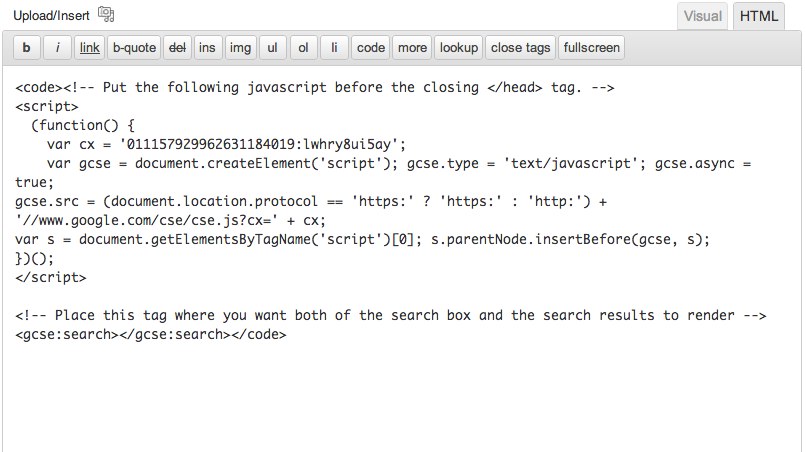
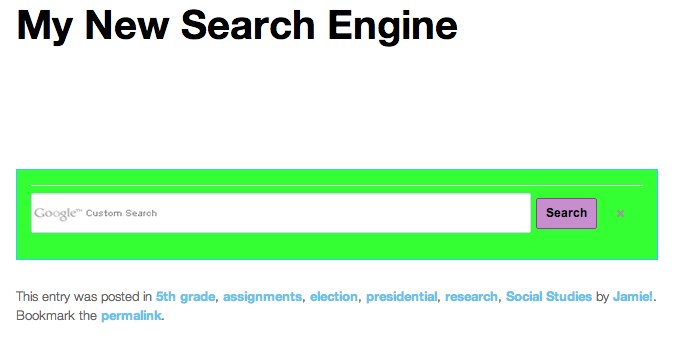
After I demonstrated the steps necessary to create a custom search engine, students began the process of producing their own. They were required to name their search engines, describe them, add the websites to be included in the search, decide on a look, and then copy and paste the html code into their student blogs. For this lesson, we focused on adding the entire website only, e.g. loc.gov/*. Other options are to add individual pages or parts of sites. When creating a custom search engine, another great option is to allow collaboration. This is accomplished by using the “Admin Account” function to invite people to directly add to the list of sites. For the purposes of this lesson, we did not create a collaborative custom search engines as I wanted each student to go through the steps individually. All students completed the required steps beautifully.

Why create a custom search engine? For the last few weeks, the students had been searching, selecting, and evaluating websites related to the national election process and one of the two major presidential candidates. Last week, they wrote blog posts about the election and included hyperlinks to some of the websites they’ve evaluated. Students put a lot of work into this process. Creating a custom search engine offers students the possibility to make  accessible all those websites in a format other than hyperlinks for their global audience. As I told the students, they are now the experts on websites about the election process and the candidates, and the search engine is one way to share their expertise. Also, creating their own search engine gives students a deeper understanding of how search engines in general work. Hopefully this in turn improves their ability to search the Web more efficiently and effectively.

In his book Who Owns the Learning: Preparing Students for Success in the Digital Age (2012), Alan November writes:

Kids who know how to use a search engine should also know how to build one. Why? First, it gives students a deeper understanding of how a search engine works, which improves their ability to conduct more positive searches. More directly, however, building a custom search engine that references content relevant to grade level, community, course content, and research topics gives students vital practice in working with online information. It also provides a marvelous vehicle for collaborating with other students and topic experts from within your school and across the globe. This kind of collaboration results in a search engine that represents a student legacy, a tool that other students can use in the years ahead.

So, did it work? Were the students able to make the connections I hoped for? To find out, I asked 5th grade to answer the following question on an exit slip: Why is it useful to create a custom search engine? Most students answered that a custom search engine helps them get better (“quality”, “no need for evaluation”) and more specific results. One student took the idea further and mentioned that a custom search engine created by her also helps others find quality information. And another student noted that a custom search engine will increase traffic on her own blog, because it will make the blog more interesting.

Moving beyond the exit slips, however, were the answers students gave when I asked them how creating a custom search engine might benefit them in school or possibly beyond. I received  several great real-world application examples, but the following two stand out: A 4th grader, an avid video gamer, told me that he could collect websites on video gaming in a custom search engine to help other video gamers find good information. A 5th grader said he would show his parents how to create a custom search engine so they could embed it in their law firm’s website to provide their clients with better information!

But in education, as they say, the teacher often becomes the student: As it turns out, due to WordPress student account settings, students were initially unable to see their custom search engines on their blogs. To make them visible, I had to use administrative privileges to access each account and recopy the search engine html code. They are now visible for all to see.

This was a very gratifying lesson. Despite the technical issues, the students were excited and motivated about creating their own custom search engines about topics meaningful to them personally. I was also very pleased that the 5th grade students asked me to share the step-by-step instructions (I had them up on the screen) to take with them. Our students understood that a search engine is a real-world tool. For them creating a search engine is an authentic skill, not just something for school. They see it as relevant for their lives beyond school.


Resources

  • http://google.com/cse
  • Various YouTube videos (look for recent videos as setup and search features may change)
  • November, Alan. Who Owns the Learning: Preparing Students for Success in the Digital Age. N.p.: Solution Tree, 2012. Ebook Reader.


Our Illiterate Students?

I’ve just finished reading Will Richardson’s TED book Why School? How Education Must Change When Learning and Information are Everywhere. It’s a very quick but insightful read that drives home the message that we need to reform our education system (like most professional texts this too refers to the public system). According to Richardson, we live in a world of “information abundance”, whereas our education system is based on a model of “information scarcity”.

The text’s premise, it’s call for change, is not new. Yet one message in particular resonated with me: the author’s statement that our students are illiterate. In the basic, traditional sense, literacy is defined as the ability to read and write. Today, however, “literacy” refers to much more.  Certainly, by the time our kids graduate, they all know to read and write. But Richardson is referring to a NCTE policy paper published in 2008, “The Definition of 21st Century Literacies”. In this paper, the NCTE expands literacy standards for students but also teachers, with an agenda to:

  • Develop proficiency with the tools of technology
  • Build relationships with others to pose and solve problems collaboratively and cross-culturally
  • Design and share information for global communities to meet a variety of purposes
  • Manage, analyze and synthesize multiple streams of simultaneous information
  • Create, critique and evaluate multi-media texts
  • Attend to the ethical responsibilities by these complex environments

To survive in today’s information rich environment, much more than traditional literacy is necessary. According to Richardson, in this sense, more than 80 percent of students graduating from private, public, parochial, and home schools are “illiterate” in RIchardson’s terms; according to the NCTE’s vice president, this figure is “more like 90 percent”.

So as I was reading, I could not help but think of the education my own children are currently receiving as 8th and 11th graders in the A-rated St. Johns County, Florida, public school system. According to Richardson, they are illiterate. In school, they are taught a curriculum “that’s growing increasingly irrelevant to today’s kids”, being exposed to one “outmoded” standardized test after another. It’s a system that requires students to be able to regurgitate facts while stifling their growth as engaged, self-motivated critical thinkers.

At the private K-8 day school, where I work,, many of the lessons spearheaded over the past few years fit right into this larger agenda.: technology integration, global collaboration.  As a librarian, my ambition for my school library is to make it a central resource for empowering these efforts.  Richardson points to the increasing challenges educators face amid the changing dynamic of “information abundance.”  As he puts it:

“Teachers need to be great at asking questions and astute at managing the different paths to learning that each child creates. They must guide students to pursue projects of value and help them connect their interests to the required standards. And they have to be participants and models in the learning process.”

Figuring Out Search Engines

I recently met our 4th and 5th grade students for a lesson about the World Wide Web and search engines: What are they? How do they work?

During my introduction of search engines, I showed the classes two websites they found fascinating: http://www.worldometers.info/, which shows different world statistics in real time (you can actually see the counters running — an equally interesting site is http://www.usarightnow.com/) and http://www.alexa.com/topsites, a Web info company listing the top 500 websites visited globally as well as by country (we looked at the US and Israel).

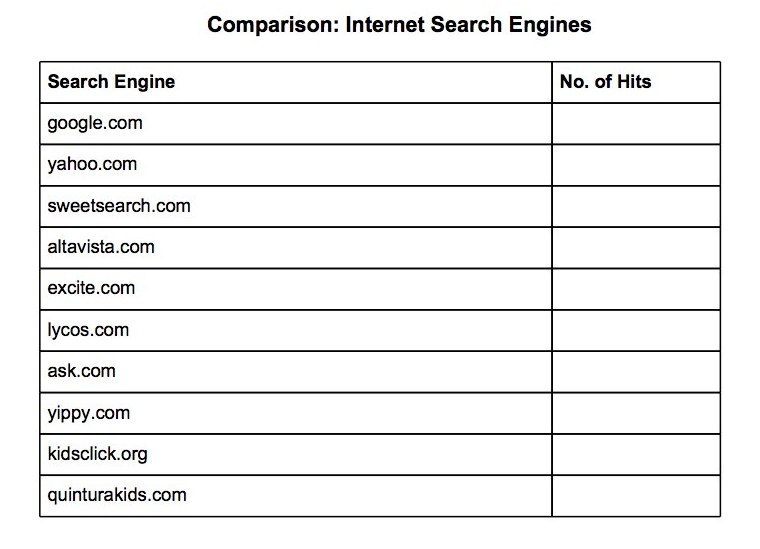
As an activity, the kids searched 10 different search engines for the phrase electoral college. The idea was for them to understand how search results can differ vastly between engines. The two kid-friendly search engines retrieved only 1 and 2 hits, respectively, as compared to over 47 billion for Google and some of the other large engines. We discussed quality v. quantity and started to talk about the fact that the great advantage of the Web — easy-access to tons of information — is also its greatest disadvantage.

To conclude the lesson, I required students to complete exit slips. I find them very useful tools to gauge what stuck and what warrants further review. For this lesson, I asked only one question:  Why do you think it is important to know how search engines work? The answer I wanted to see was: “Because all search engines index different web pages and offer different search functions”. The answer I got from most students was essentially: “It is important to know how search engines work to help verify information.” Maybe I should not have mentioned to the classes that we are going to learn how to evaluate web pages in our next sessions as it seemed that they were already focusing on the fact that not all information retrieved through a web search is of the same value? For this lesson, I intended to simply focus on the mechanics of search engines. The kids were way ahead — and I learned a lesson as well.

A Note Taking Exercise

I am currently teaching a unit on website evaluation to our 4th and 5th grade students. We meet weekly for a one-hour session over the period of eight weeks. This is integrated into a social studies unit on the presidential election.

The social studies teacher asked me to start off by teaching a lesson on note taking. As I told the students, it’s a skill they will use throughout their lives, not only in school but also in working life. Each class worked through a one-page encyclopedia entry on the Everglades I had copied from a Florida history text. We applied the two-column method as I personally like it for its versatility; it’s easily applied to text, film, lectures, presentations. As a class, we worked our way through the first few paragraphs, identifying the main idea and supporting detail. Then students worked through the remainder of the text in small groups.

For the students, the hard part was to avoid copying whole sentences rather than jotting down keywords/phrases, preferably in their own words. Their homework assignment was to then write an informational paragraph using just their notes (I collected the original text).

As teachers, we like those critical thinking skills that are put to use when students are taking notes. Students in both grades stated when asked why note taking can be useful: We use our brains. Indeed! So at the end of the lessons I asked students to fill out exit slips with the following questions: Why is it important to take notes? How can note taking help you with your school work? I’ve compiled the answers for each class in two separate Wordles:

4th Grade:

5th Grade:

Obviously the students got it: “to help remember information” was answered by all. Some went further and said it’s a good organizational tool, a study aid, helps with grades. A couple of 5th graders also added that it helps avoid plagiarism. I think the students understood the idea and importance of taking notes. Now they just need to continue to apply those note taking skills to become fluent.